Stompbox Layouts
@vessel-dsp/stompbox consumes .vdsp or CircuitDocument panel data from @vessel-dsp/core and emits fabrication and preview artifacts.
It stays headless. It must not import React, React DOM, Three.js, browser rendering APIs, AudioContext, or an audio runtime.
Outputs
Section titled “Outputs”- Drill-layout manifests.
- Drill-template SVG strings for
previewand A4printmodes. - Orthographic preview SVG views for
top,bottom,left,right, andback. - Mesh-backed preview GLB bytes assembled from caller-provided CAD part GLBs and STEP companions.
- Optional text, SVG, or image decal metadata for brand, model, and sticker artwork.
- Headless pedal state helpers and preview state patches for knobs, LEDs, and footswitches.
Hardware profile boundary
Section titled “Hardware profile boundary”Production part profiles, enclosure profiles, style profiles, and asset roots belong to the application that calls @vessel-dsp/stompbox. Pass the mechanical catalog through hardwareProfile, and pass any named visual/placement preset through styleProfile. The docs demo keeps its Boss/MXR presets in stompbox-demo-profiles.json; the package does not export demo hardware or style presets.
When a .vdsp document already carries mechanical.enclosure, partProfiles, and panel physical.partProfileId data, derive a generated-stub profile directly from the document:
import {  createStompboxDrillLayoutFromVdsp,  createStompboxHardwareProfileFromVdsp,} from "@vessel-dsp/stompbox";
const hardwareProfile = createStompboxHardwareProfileFromVdsp(vdspSource, {  id: "pedal-derived-hardware",  label: "Pedal derived hardware",});
const layout = createStompboxDrillLayoutFromVdsp(vdspSource, {  hardwareProfile,});
The derived profile is suitable for drill layout, drill-template SVG, and generated-stub previews. Production GLB assembly still needs caller-provided asset paths or a full application hardware profile because portable .vdsp part profiles do not include GLB target metadata.
import demoProfiles from "./stompbox-demo-profiles.json";import type { StompboxHardwareProfile } from "@vessel-dsp/stompbox";
const hardwareProfile = {  ...demoProfiles.defaultHardwareProfile,  partProfiles: demoProfiles.partProfiles,  enclosureProfiles: demoProfiles.enclosureProfiles,} satisfies StompboxHardwareProfile;
const styleProfile = demoProfiles.styleProfiles.find((profile) =>  profile.id === demoProfiles.defaultStyleProfileId,);
if (styleProfile === undefined) {  throw new Error("Missing stompbox style profile");}
const cadPartsRoot = "/absolute/path/to/packages/stompbox/assets/cad/parts";
Placement provenance
Section titled “Placement provenance”Physical placement in .vdsp is optional.
When panel.faces[].elements[].physical is present, stompbox preserves it and marks the placement as vdsp-declared.
When physical placement is absent, stompbox may generate deterministic placement and marks it as auto-generated.
Mechanical defaults
Section titled “Mechanical defaults”Schematic documents may omit enclosure hardware such as input/output jacks, bypass footswitch, status LED, and 9V connector. Stompbox owns those mechanical defaults and can synthesize them without changing the core .vdsp schema.
Set includePowerJack: false to opt out of the synthesized 9V connector.
import { createStompboxDrillLayoutFromVdsp } from "@vessel-dsp/stompbox";
const layout = createStompboxDrillLayoutFromVdsp(vdspSource, {  hardwareProfile,  styleProfile,  includePowerJack: false,});
Stacked concentric potentiometers
Section titled “Stacked concentric potentiometers”The circuit/PCB model is packaging-agnostic: two pots are two pots. A stacked concentric pot is an optional part-variant choice, not a circuit property. By default a layout auto-generates separate pots; concentric realization happens only when the placement selects a multi-surface concentric part.
A concentric part profile declares an ordered surfaces array (bottom to top),
each with its own dial geometry and stackOffsetMm. To stack N controls onto
it, give each pot’s placement element a shared physical.mountId, the same
physical.partProfileId, the same centerMm, and a distinct physical.surface
naming one of the part’s surfaces:
elements: - bind: { componentId: BASS } physical: { partProfileId: pot-concentric-3, mountId: m-tone, surface: lower, centerMm: { x: 30, y: 28 } } - bind: { componentId: MID } physical: { partProfileId: pot-concentric-3, mountId: m-tone, surface: middle, centerMm: { x: 30, y: 28 } } - bind: { componentId: TREBLE } physical: { partProfileId: pot-concentric-3, mountId: m-tone, surface: upper, centerMm: { x: 30, y: 28 } }Stompbox groups elements by mountId into a single drill hole at the shared
center and emits N stacked dials (one per surface, sized and lifted per the
part profile), each wired to its own control so every section rotates
independently. This handles dual, triple, or any N concentric pot with one
mechanism.
Orphan and inconsistent bindings are diagnosed. Core reports catalog-free
structural problems (panel-mount-orphan for a surface without a mountId, a
mount member missing its surface or partProfileId; panel-mount-inconsistent
for duplicate surfaces or mixed partProfileId/centerMm within a mount).
Stompbox reports catalog-aware problems (unknown-part-surface for a surface the
part does not declare; concentric-mount-incomplete when a declared surface is
left unfilled).
Placement validation
Section titled “Placement validation”Layout diagnostics report physical placement problems. placement-collision means visible part geometry overlaps. placement-clearance means parts do not overlap, but the gap is below the requested clearance. placement-out-of-bounds means a hole exceeds the enclosure face bounds.
import { createStompboxDrillLayoutFromVdsp } from "@vessel-dsp/stompbox";
const layout = createStompboxDrillLayoutFromVdsp(vdspSource, {  hardwareProfile,  styleProfile,  includePowerJack: false,  minPartClearanceMm: 5,});
const hasBlockingPlacementIssue = layout.diagnostics.some((diagnostic) =>  diagnostic.code === "placement-collision"  || diagnostic.code === "placement-clearance"  || diagnostic.code === "placement-out-of-bounds",);
Generate preview artifacts
Section titled “Generate preview artifacts”import { createStompboxDrillTemplateSvgFromVdsp, createStompboxPreviewGlbFromVdsp, createStompboxPreviewSvgViewsFromVdsp,} from "@vessel-dsp/stompbox";
const drillTemplateSvg = createStompboxDrillTemplateSvgFromVdsp(vdspSource, { hardwareProfile, styleProfile, mode: "print",});
const views = createStompboxPreviewSvgViewsFromVdsp(vdspSource, { hardwareProfile, styleProfile,});const glb = createStompboxPreviewGlbFromVdsp(vdspSource, { hardwareProfile, styleProfile, basePath: cadPartsRoot,});Drill-template holes use fabrication clearance diameters from part profiles. Preview views and collision checks may use larger visible geometry such as jack rings, bushings, nuts, and bezels.
Live preview state
Section titled “Live preview state”Use the live-state helpers when a preview needs to reflect pedal state while a
user drags a knob, presses a footswitch, or toggles the bypass state.
@vessel-dsp/stompbox owns the physical preview state only. It does not compile
.vdsp, post worklet messages, import React, or mutate SVG/Three.js objects.
Use @vessel-dsp/control-ui when the host app wants
React controls that emit the same core PanelMessage values that can drive
stompbox preview state.
import { parseCircuitDocumentFile } from "@vessel-dsp/core";import {  createDefaultStompboxPedalStateFromVdsp,  createStompboxControlSurface,  createStompboxPedalStateStore,  createStompboxPreviewFromVdsp,} from "@vessel-dsp/stompbox";
const document = parseCircuitDocumentFile(vdspSource, {  filename: "pedal.vdsp",});const surface = createStompboxControlSurface(document, {  pedalId: "stage-1",  compiledControls: runtimeControlsFromYourCompiler,});const preview = createStompboxPreviewFromVdsp(vdspSource, {  hardwareProfile,  styleProfile,});const state = createDefaultStompboxPedalStateFromVdsp(vdspSource, {  pedalId: surface.pedalId,  compiledControls: runtimeControlsFromYourCompiler,});const store = createStompboxPedalStateStore(state, { preview });
store.subscribePreviewPatch((patch) => {  applyPatchToYourSvgOrGlbViewer(patch);});
store.turnKnob("GAIN", 0.82);store.pressFootswitch("switch-bypass", true);
compiledControls is optional. When a downstream .vdsp compiler already
exposes control metadata, pass descriptors shaped like { id, sourceComponentId, name, kind, value, min, max, step } plus optional unit,
sweep, options, and targets. Stompbox merges that audio-bound metadata
with source-panel labels and order, then returns headless command routes. It
does not route audio itself.
Live GLB previews require semantic state targets in user-provided LED and footswitch part profiles. The LED target should resolve to the lens/light node. The footswitch target should resolve to the moving actuator/plunger node; a tap animation can move that node and return it without moving the whole switch assembly.
const ledPartProfile = {  // ...  stateTargets: {    led: {      lens: {        selector: {          nodeName: "o1.2",          meshNameIncludes: "5mm_led_lens",        },      },    },  },};
const footswitchPartProfile = {  // ...  stateTargets: {    footswitch: {      actuator: {        selector: {          nodeName: "o1.3",          meshNameIncludes: "plunger",        },      },      travelAxis: "z",      travelMm: 1.2,    },  },};
Validate the GLBs before using them for live preview state:
import {  validateStompboxGlbAssetFile,  validateStompboxHardwareProfileAssets,} from "@vessel-dsp/stompbox";
const ledValidation = validateStompboxGlbAssetFile(  "/cad/parts/led-bezel-lh5/led.step.glb",  ledPartProfile,);
const profileValidation = validateStompboxHardwareProfileAssets(hardwareProfile, {  basePath: "/cad/parts",});
Missing or ambiguous live targets produce diagnostics such as
missing-state-target-contract, missing-state-target, and
ambiguous-state-target. GLB generation includes the same diagnostics and
stores resolved target metadata on preview part nodes, for example
extras.stateTargets.led.lens or
extras.stateTargets.footswitch.actuator.
Pointer interaction stays in the consuming app. Convert pointer events into state commands, dispatch those commands, and apply the resulting preview patch to the renderer:
import {  applyStompboxPreviewInteraction,  createStompboxFootswitchPressCommand,  createStompboxKnobTurnCommand,  createStompboxPreviewStatePatch,} from "@vessel-dsp/stompbox";
const knobCommand = createStompboxKnobTurnCommand(surface, {  controlId: "GAIN",  position: 0.65,});const nextState = applyStompboxPreviewInteraction(  store.getSnapshot(),  knobCommand,);const patch = createStompboxPreviewStatePatch(  preview,  nextState,  store.getSnapshot(),);
store.dispatch(knobCommand);applyPatchToYourSvgOrGlbViewer(patch);
const footswitchCommand = createStompboxFootswitchPressCommand(surface, {  partId: "switch-bypass",  pressed: true,});store.dispatch(footswitchCommand);
Synthesized switch-bypass and led-status follow the pedal-level enabled
state. Source-declared knobs, switches, and LEDs follow their ControlState
entries. The 9V connector remains a physical preview default and can be omitted
with includePowerJack: false.
Run the docs locally with bun run docs:dev, then open
http://localhost:4321/core/guides/stompbox/. The 3D example below includes a
docs-only live-state control panel that rotates generated knob nodes, depresses
footswitch nodes, and changes LED lens materials in the loaded GLB.
Stickers and decals
Section titled “Stickers and decals”Pass decals to preview and drill-template helpers when a frontend needs
adjustable stickers. Decals can target the top, left, right, back, or
bottom plane. Grid placement snaps every sticker to the center of a face-local
cell. The grid uses the requested columns and rows, capped so each cell
remains at least 12 mm wide or tall. For example, a 40 mm wide face can address
at most 3 columns.
Text decals carry editable text color plus fontFamily, so a consuming app can
load the matching Google Font in its own page. SVG decals can use
currentColor and a decal color. Image decals use caller-provided URLs or
data URIs through href.
const decals = [  {    id: "brand-label",    kind: "text",    text: "FUZZ LAB",    face: "top",    color: "#2563eb",    fontFamily: '"Roboto", sans-serif',    placement: { kind: "grid", columns: 4, rows: 4, column: 4, row: 2 },    sizeMm: { widthMm: 28, heightMm: 7 },  },  {    id: "side-vector",    kind: "svg",    face: "left",    svg: '<svg xmlns="http://www.w3.org/2000/svg" viewBox="0 0 10 10"><path d="M1 5 H9" stroke="currentColor"/></svg>',    color: "#ef4444",    placement: { kind: "grid", columns: 2, rows: 4, column: 2, row: 3 },    sizeMm: { widthMm: 10, heightMm: 8 },  },  {    id: "back-image",    kind: "image",    face: "back",    href: "/artwork/sticker.png",    placement: { kind: "grid", columns: 4, rows: 1, column: 4, row: 1 },    sizeMm: { widthMm: 16, heightMm: 8 },  },] as const;
const preview = createStompboxPreviewFromVdsp(vdspSource, {  hardwareProfile,  styleProfile,  decals,});
2D and 3D model previews
Section titled “2D and 3D model previews”Use createStompboxPreviewSvgViewsFromVdsp() or
createStompboxPreviewSvgViews() when you need static 2D SVG views. Use
createStompboxPreviewGlbFromVdsp() or createStompboxPreviewGlb() when a
frontend needs model-backed 2D or interactive 3D preview.
Keep Three.js in the consuming app. @vessel-dsp/stompbox creates the GLB bytes
and metadata; the viewer loads that GLB, chooses a perspective or orthographic
camera, renders decal metadata into textures, and applies display-only effects
such as CAD-style linework. The GLB is in millimeters and includes stable node
names such as enclosure-box-1590b, part-knob-GAIN, and
hole-backing-jack-IN.
The docs viewer uses an orthographic camera for the top preview and a
perspective camera with orbit controls for the 3D preview. Pass
backgroundColor, gridColor, and gridOpacity to style the viewer
background. The default docs viewer background is black with #ccc grid lines
at 0.2 opacity. Pass toon={true} to replace imported CAD mesh materials
with Three.js MeshToonMaterial, and pass toonEdgeColor="#69145a" for the
toon edge pass and thicker outline. Pass linework={true} and lineworkColor
to enable CAD-style border linework with Three.js EdgesGeometry after the GLB
loads. Pass grain={true} to add material-scoped screen-space grain to the
pedal model without texturing the viewer background; grainScale controls the
texture size and grainIntensity controls the opacity:
function addCadLinework(root: THREE.Object3D, lineworkColor = "#111827") {  const meshes: THREE.Mesh[] = [];  const material = new THREE.LineBasicMaterial({    color: new THREE.Color(lineworkColor),    transparent: true,    opacity: 0.85,    depthTest: true,    depthWrite: false,  });
  root.traverse((object) => {    if (object instanceof THREE.Mesh && object.userData?.kind !== "decal") {      meshes.push(object);    }  });
  for (const mesh of meshes) {    const edges = new THREE.EdgesGeometry(mesh.geometry, 35);    const lines = new THREE.LineSegments(edges, material);    lines.name = `${mesh.name || "mesh"}-cad-linework`;    lines.renderOrder = 30;    mesh.add(lines);  }}
Pass crt={true} to apply a full-screen CRT post-processing pass over both the
orthographic top (2D) and orbit (3D) views. The viewer renders the scene into an
offscreen render target and then composites it through a tweakable
cathode-ray-tube shader (scanlines, barrel curvature, vignette, bloom, and an
optional RGB shift) on a full-screen triangle. Tune it with crtCurvature,
crtScanlineIntensity, crtScanlineCount, crtVignette, crtRgbShift, and
crtFlicker. Flicker is disabled automatically when the visitor prefers reduced
motion. The CRT shader is vendored from
gingerbeardman/webgl-crt-shader
(MIT).
Pass glitch={true} to add an occasional digital-glitch burst (displacement,
RGB tearing, and noise) on top of the CRT look. It fires on a randomized, sparse
schedule — glitchInterval (seconds, default 8) sets the average gap between
bursts, each lasting a few hundred milliseconds — so it reads as an intermittent
signal fault rather than constant noise. The glitch runs as an intermediate pass
before the CRT composite and is skipped entirely on frames with no active burst,
so it is effectively free when idle. It is disabled when the visitor prefers
reduced motion. The glitch shader is vendored from three.js’
DigitalGlitch
(MIT).
Helper reference
Section titled “Helper reference”Use the FromVdsp helpers when your frontend is holding serialized .vdsp
text. Use the document helpers when your app has already parsed or edited a
CircuitDocument.
| Need | .vdsp helper | CircuitDocument helper |
|---|---|---|
| Drill hole coordinates and diagnostics | createStompboxDrillLayoutFromVdsp | createStompboxDrillLayout |
| Drill-template manifest | createStompboxDrillTemplateFromVdsp | createStompboxDrillTemplate |
| Drill-template SVG string | createStompboxDrillTemplateSvgFromVdsp | createStompboxDrillTemplateSvg |
| Preview manifest | createStompboxPreviewFromVdsp | createStompboxPreview |
| Orthographic 2D SVG views | createStompboxPreviewSvgViewsFromVdsp | createStompboxPreviewSvgViews |
| Mesh-backed 3D GLB bytes | createStompboxPreviewGlbFromVdsp | createStompboxPreviewGlb |
| Default pedal state | createDefaultStompboxPedalStateFromVdsp | createDefaultStompboxPedalState |
| Control surface | Parse with core first | createStompboxControlSurface |
| Preview state patch | createStompboxPreviewStatePatch | createStompboxPreviewStatePatch |
| Frontend recolor patch | createStompboxAppearancePatch | createStompboxAppearancePatch |
| Resolved appearance alias | resolveStompboxAppearance | resolveStompboxAppearance |
createStompboxAppearancePatch() and resolveStompboxAppearance() both accept
the generated preview manifest. resolveStompboxAppearance() is the naming
alias to use when frontend code wants the final render targets without implying
that it is generating an incremental diff.
Preview examples
Section titled “Preview examples”These examples are generated from the same helpers above using docs-owned
hardware and style profiles from stompbox-demo-profiles.json.
Orthographic GLB top preview
This uses the generated GLB with an orthographic top camera, so side-mounted audio jacks and the 9V DC connector stay side-facing in the preview instead of being redrawn as top-facing circles.
3D stompbox preview
Drill layout preview
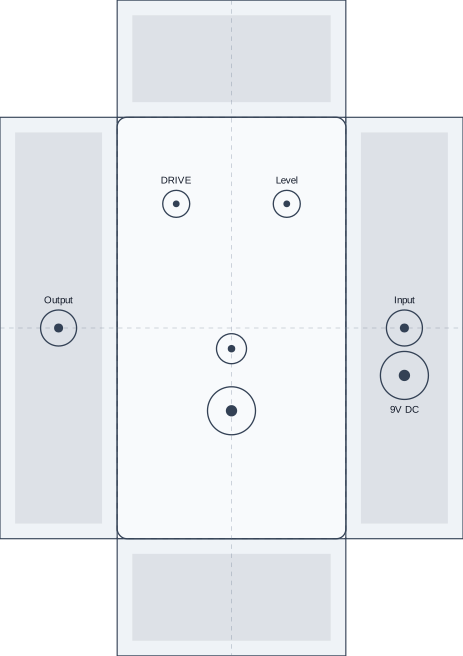
The SVG above is produced by createStompboxDrillTemplateSvgFromVdsp() in
preview mode. The underlying drill-layout JSON is also available:
download the drill layout.
The GLB is produced by createStompboxPreviewGlbFromVdsp(). It includes copied
CAD mesh data, baked material colors where possible, and the frontend appearance
patch at asset.extras.appearance.
Customize preview and drilling appearance
Section titled “Customize preview and drilling appearance”Use appearance when a frontend needs to recolor the enclosure, LED, labels,
or drill-template ink without changing physical placement. Knob bodies keep the
material colors from their imported CAD/GLB assets. Keep
state for live control values such as knob position or LED on/off state.
.vdsp v3 can self-contain stompbox visual design at top-level appearance.
The stompbox enclosure color lives at appearance.enclosure.color when
appearance.kind is stompbox:
appearance: kind: stompbox enclosure: color: "#f8fafc" strokeColor: "#111827" defaults: label: color: "#2563eb" fontFamily: Vessel Blockappearance.kind is mutually exclusive: use stompbox for pedal enclosure,
template, part, and label styling, or amp for amp-specific appearance. The
helper appearance option still overrides embedded .vdsp values when both
are provided.
import {  createStompboxAppearancePatch,  createStompboxDrillTemplateSvgFromVdsp,  createStompboxPreviewFromVdsp,  createStompboxPreviewGlbFromVdsp,  createStompboxPreviewSvgViewsFromVdsp,  resolveStompboxAppearance,} from "@vessel-dsp/stompbox";
const appearance = {  enclosure: {    color: "#f97316",    strokeColor: "#7c2d12",    roughnessFactor: 0.45,  },  template: {    guideColor: "#0ea5e9",    foldColor: "#334155",    holeStrokeColor: "#7c3aed",    centerDotColor: "#581c87",  },  defaults: {    led: { color: "#ef4444", offColor: "#fee2e2" },    label: { color: "#111827" },  },  controls: {    GAIN: {      label: { text: "DRIVE", color: "#ffffff" },    },    LED1: {      led: { color: "#22c55e", offColor: "#064e3b" },      label: { text: "READY", color: "#16a34a" },    },  },} as const;
const drillTemplateAppearance = {  ...appearance,  enclosure: {    color: "#f8fafc",    strokeColor: "#334155",  },  controls: {    ...appearance.controls,    GAIN: {      ...appearance.controls.GAIN,      label: { text: "DRIVE", color: "#111827" },    },  },} as const;
const state = {  LED1: { kind: "led", on: true, intensity: 0.6 },} as const;
const preview = createStompboxPreviewFromVdsp(vdspSource, {  hardwareProfile,  styleProfile,  appearance,  state,});
const views = createStompboxPreviewSvgViewsFromVdsp(vdspSource, {  hardwareProfile,  styleProfile,  appearance,  state,  grain: true,});const glb = createStompboxPreviewGlbFromVdsp(vdspSource, {  hardwareProfile,  styleProfile,  basePath: cadPartsRoot,  appearance,  state,});const drillTemplateSvg = createStompboxDrillTemplateSvgFromVdsp(vdspSource, {  hardwareProfile,  styleProfile,  mode: "print",  appearance: drillTemplateAppearance,});
const patch = createStompboxAppearancePatch(preview);const samePatch = resolveStompboxAppearance(preview);
The patch is stable JSON for frontend code. It uses render target ids such as
part-led-LED1, decal-label-knob-GAIN, and
enclosure-box-1590b so a viewer can recolor SVG or Three.js objects without
parsing arbitrary material names.
Preview SVGs expose stable hooks including data-control-id,
data-part-family, .knob-body, .knob-indicator, .led-lens,
.led-bezel-ring, .ring-outer, .ring-inner, and .label-text. Drill-template SVGs expose
.top-panel, .side-panel, .hole, .drill-hole-center-dot, .fold-line,
and .guide-line.
Preview GLB output bakes available colors into render materials and stores the
same patch at asset.extras.appearance for runtime recoloring in a frontend
viewer. Appearance-colored GLB materials also carry a renderColorMode: "flat-color" hint so the docs Three.js preview can render exact UI colors
without lightening them under scene lights. Knob part meshes keep their imported
materials; LED bezel parts keep their imported metal material, and only the
imported center lens mesh receives the LED color and emissive state.