Pro Co Rat Schematic
This example uses the checked-in LiveSPICE fixture at tests/fixtures/schx/livespice-examples/Pro Co Rat.schx.
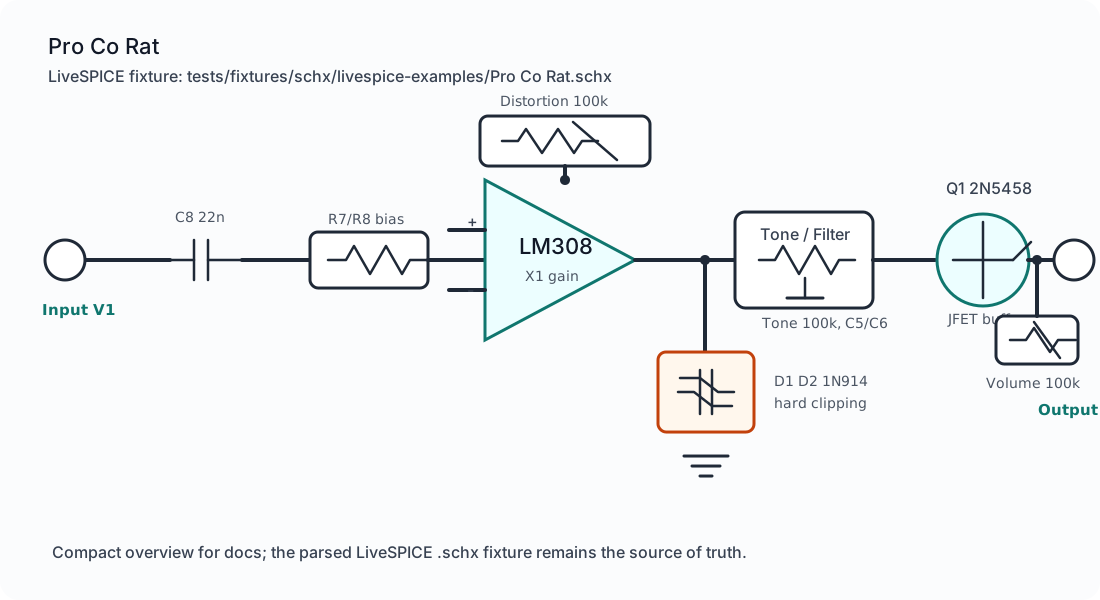
The fixture is useful as a conversion sanity check because it covers the parts of the pedal that are easy to lose in a schematic importer:
X1preserves the LM308 op-amp identity.D1andD2preserve the 1N914 hard clipping pair.Toneand nearby RC parts preserve the tone/filter network.Q1preserves the 2N5458 JFET buffer.Distortion,Tone, andVolumepreserve user-facing controls.
The SVG above is a compact schematic overview for docs. The source of truth is still the .schx fixture and the parsed CircuitDocument.
Convert the fixture
Section titled “Convert the fixture”import { readFileSync } from "node:fs";import { convertCircuitDocumentFile, parseCircuitDocumentFile, serializeCircuitJsonDocument,} from "@vessel-dsp/core";
const source = readFileSync( "tests/fixtures/schx/livespice-examples/Pro Co Rat.schx", "utf8",);
const document = parseCircuitDocumentFile(source, { filename: "Pro Co Rat.schx",});
const { elements, warnings } = serializeCircuitJsonDocument(document);
const vdsp = convertCircuitDocumentFile(source, { inputFilename: "Pro Co Rat.schx", outputFormat: "vdsp", outputFilename: "Pro Co Rat.vdsp",});elements is official Circuit JSON suitable for downstream tscircuit tooling. warnings should be treated as caller-visible conversion diagnostics, not ignored.
VDSP source preview
Section titled “VDSP source preview”The preview is intentionally excerpted from the generated .vdsp source so the page stays readable. The full output preserves every converted component, terminal, wire, and diagnostic emitted by the serializer.
schema: circuit-interchange/v2metadata:  name: ""  description: ""  partNumber: ""source:  format: interchange  filename: "Pro Co Rat.vdsp"components:  - id: _1    kind: label    name: _1    sourceTypeName: "Circuit.Label, Circuit, Version=1.0.0.0, Culture=neutral, PublicKeyToken=null"    origin:      x: 0      y: -160    properties:      Text: "Pro Co Rat"      Subtext: "https://www.electrosmash.com/proco-rat"
  # ... input, bias, gain, tone, and wiring entries omitted ...
  - id: D1    kind: diode    name: D1    sourceTypeName: "Circuit.Diode, Circuit, Version=1.0.0.0, Culture=neutral, PublicKeyToken=null"    origin:      x: 100      y: 150    properties:      Type: Diode      Name: D1      PartNumber: "1N914"
  - id: X1    kind: opamp    name: X1    sourceTypeName: "Circuit.OpAmp, Circuit, Version=1.0.0.0, Culture=neutral, PublicKeyToken=null"    origin:      x: -150      y: 100    properties:      Rin: "40 MΩ"      Rout: "50 Ω"      Aol: "300 k"      GBP: "1 MHz"      Name: X1      PartNumber: LM308
  - id: Q1    kind: jfet    name: Q1    sourceTypeName: "Circuit.JunctionFieldEffectTransistor, Circuit, Version=1.0.0.0, Culture=neutral, PublicKeyToken=null"    origin:      x: 490      y: 200    properties:      Type: N      Name: Q1      PartNumber: "2N5458"
  - id: Tone    kind: variable-resistor    name: Tone    properties:      Resistance:        raw: "100 kΩ"        value: 100000        unit: "Ω"      Wipe: "0.5"      Sweep: Logarithmic
Control panel from VDSP
Section titled “Control panel from VDSP”Yes. Use extractPanel(document) from @vessel-dsp/core. Parse the .vdsp into a CircuitDocument, then extract the typed panel descriptor from that document.
import {  extractPanel,  parseCircuitDocumentFile,} from "@vessel-dsp/core";
const vdspDocument = parseCircuitDocumentFile(vdsp, {  filename: "Pro Co Rat.vdsp",});
const panel = extractPanel(vdspDocument);
const controlIds = panel.knobs.map((knob) => knob.id);// ["Distortion", "Tone", "Volume"]
For this fixture, the generated panel descriptor includes the three front-panel controls and the inferred audio ports:
{ "knobs": ["Distortion", "Tone", "Volume"], "jacks": ["V1:input", "S1:output"], "switches": [], "leds": []}If the .vdsp source declares physical panel placement metadata, extractPanel() returns it as panel.placement; otherwise it only reports the inferred controls and ports.
Persist edited placement
Section titled “Persist edited placement”When a UI lets the user drag an existing panel element, use movePanelElement() to update the element’s physical.centerMm, then serialize the document back to .vdsp.
import {  movePanelElement,  serializeCircuitDocumentFile,} from "@vessel-dsp/core";
const movedDocument = movePanelElement(vdspDocument, {  faceId: "top",  elementId: "tone-knob",  centerMm: { x: 12, y: -18 },});
const movedVdsp = serializeCircuitDocumentFile(movedDocument, { format: "vdsp" });
The helper preserves existing fabrication metadata such as drillDiameterMm, partProfileId, and locked. If the element exists but has no physical block yet, the helper creates one with units: "mm".
What this proves
Section titled “What this proves”The example proves source-format parsing and Circuit JSON export. It does not claim LiveSPICE audio simulation parity.